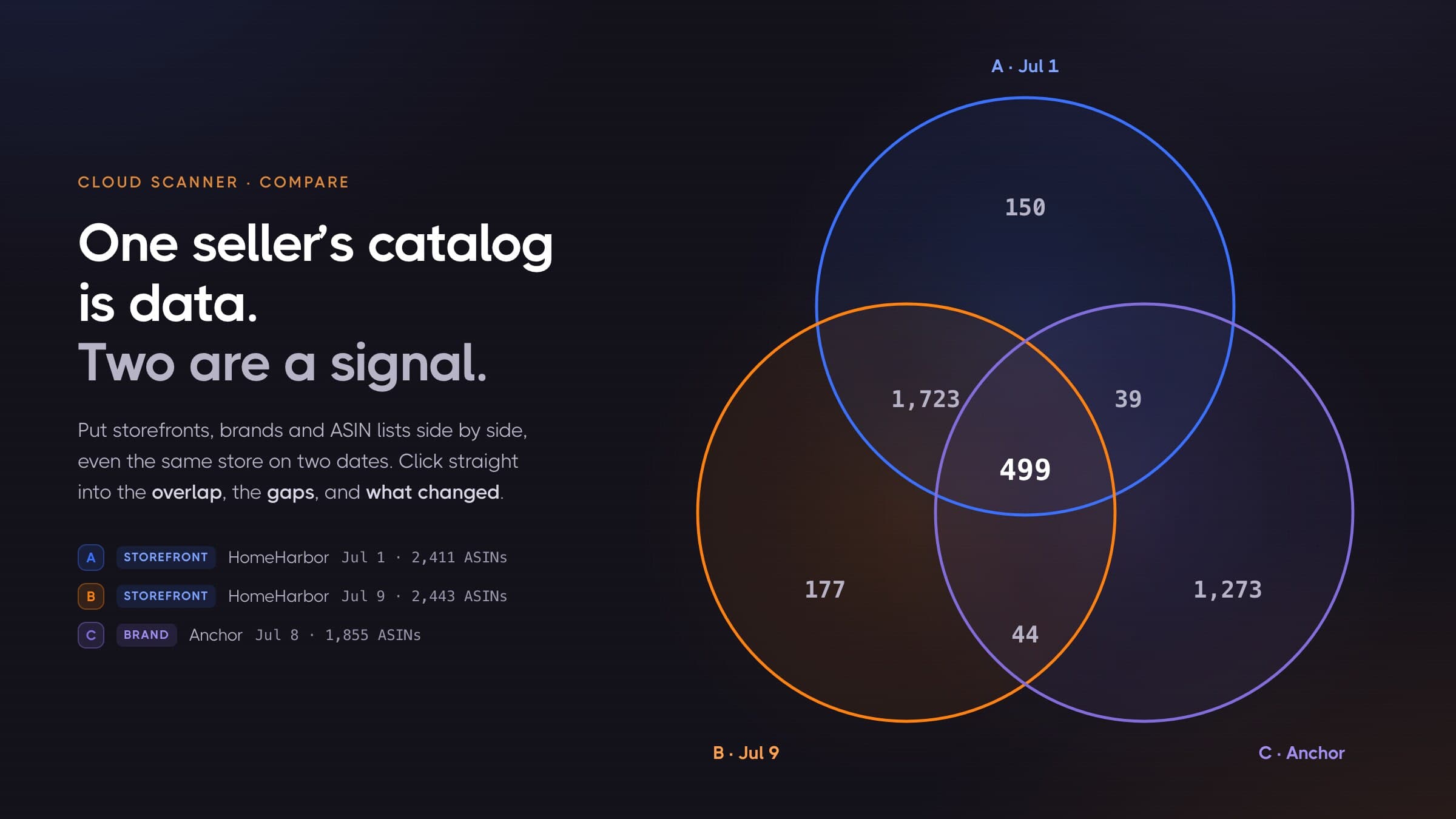
Amazon Storefront Stalking: See Every Product, Not a Sample
Storefront stalking without the guesswork: an Amazon storefront only ever shows you a shifting sample of the store. How to extract the whole catalog, even 100,000+ listings, then rescan it to see every change.
Every Amazon seller has done this at least once: you find a competitor who is clearly doing something right, you click through to their storefront, and you start scrolling. Page 3. Page 9. Page 17. Then either the pages run out, or they keep coming but quietly start showing you products you've already seen. And you know, with certainty, that this seller carries far more than what you were shown.
Sellers call this research storefront stalking: watching what a competitor sells, and what they change. And that is the entire problem with it. The data is public. Amazon just won't hand you more than a sliver of it, and it won't tell you when that sliver changes.
This article covers both halves of the stalking job: how to extract a complete Amazon storefront (including stores with 100,000+ listings) and how to re-scan it later so you see precisely what changed. New products. Removed products. Price moves. Stock-outs. Buy Box flips.
Why an Amazon storefront never shows you the whole catalog
A seller's storefront is just an Amazon search result with a me= filter, and Amazon search results are built for browsing, not for enumeration. How far you can page depends on the store, the layout, and the exact way you entered. Every road ends the same way: well short of the catalog.
We measured the common case against a live storefront while writing this article. On 9 July 2026 we walked amazon.com/s?me=A294P4X9EWVXLJ, AnkerDirect's storefront. Amazon reported last_page_number: 20 and served 16 products per page. Page 20 came back with just two products, labelled results 305-306. Page 21 returned nothing at all. That entire storefront, through its front door, was 306 products.
Your store may fail differently, because the wall is not one fixed number. Some entries stop at 20 pages. Others will let you page ten times deeper, and those are the ones that fool people: in our testing, deep walks kept returning full pages of products, but past roughly page 165 they were recycling tiles we had already collected, and the count of unique products flatlined no matter how large the store really was. The result totals Amazon claims at the top are no anchor either; on large stores they snap to suspiciously round numbers. There is no page at which you can say "now I've seen everything", and no counter that tells you what you missed.
Worse, the few hundred you can see aren't a trustworthy sample:
- The default "Featured" sort reshuffles. Amazon's own help page says Featured ranking factors in purchase frequency, availability, delivery speed and customer preferences. Load page 4 twice and you can get different products. Pages overlap and skip.
- Out-of-stock products are hidden by default. Amazon suppresses them unless you explicitly ask for them with the Include Out of Stock filter. A competitor's stock-outs are exactly what you want to see, and they're the first thing the page removes.
- Variation siblings collapse. A shoe in nine colours frequently appears as one representative tile, so a "306-product" store is often several times bigger even inside its visible window.
- Even the facets move. We asked that same storefront for its department list three times in five minutes and got back eight departments, then ten, then nine. The navigation you'd use to explore the store by hand isn't stable either.
- There's no snapshot. Even if you copy those 306 ASINs into a spreadsheet, you have nothing structured to compare against next month.
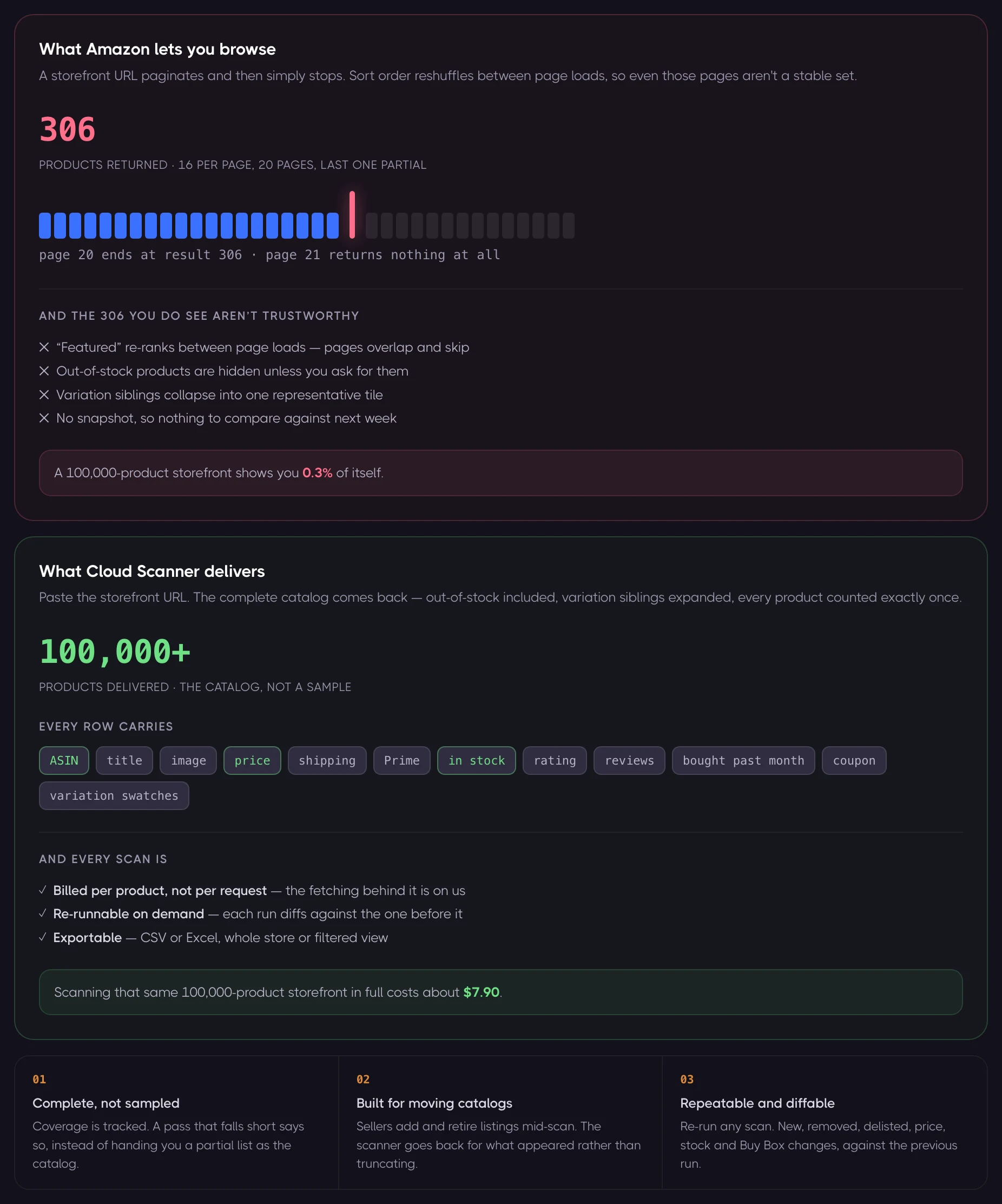
Put a number on it: however you walk in, a storefront with 100,000 listings will show you at most a few thousand of them, and it will never tell you which few thousand you got.
How to see all products in an Amazon storefront
You cannot page past the wall. Reaching the rest of the catalog means not walking in through the front door at all.
That is the job ASINSpotlight's Cloud Scanner does for you. Paste a storefront URL or a seller ID, and it returns that seller's complete catalog. Whether the store has 300 products or 100,000, the workflow is identical. Getting there is harder than it looks, and the difficulties are worth knowing even if you never run a scan with us: they explain why a weekend scraping script hands back 60% of a store and never tells you which 60%.
- Completeness isn't observable from the inside. Amazon never tells you how many products a seller has. A crawler that stops when it runs out of pages cannot know whether it finished or was cut off, and neither can you. Cloud Scanner tracks its own coverage, and when a pass falls short it says so rather than presenting a partial list as the catalog.
- The catalog moves while you read it. Walking a large storefront takes time, and sellers add and retire listings while you're walking. A scan has to notice that the ground shifted and go back for what appeared, instead of quietly truncating.
- Out-of-stock products have to be asked for. They're excluded by default, and they're usually the ones carrying the signal you came for.
- Variation siblings have to be expanded. The nine-colour shoe that renders as one tile is nine ASINs, nine prices, and nine independent stock states.
- You should be billed for products, not requests. Everything above means fetching far more pages than the store has products. That is our problem, not yours: Cloud Scanner charges per unique product row delivered, and never for the machinery behind it.
Every product that comes back from a list pass carries: ASIN, title, image, price, shipping, Prime status, in-stock status, rating, review count, bought-in-past-month, coupon, and variation swatch data. Out-of-stock products included. You can stop there, or you can go deeper. More on that when we get to cost.
Storefront scans accept a URL from any Amazon marketplace ASINSpotlight supports: nineteen of them, from amazon.com to amazon.com.br.
Storefront stalking, done properly: the rescan
Pulling a competitor's catalog once is a snapshot. It tells you what they sell. It does not tell you what they're doing.
The interesting questions are all differential:
- Which products did they add since last month?
- What did they quietly stop selling?
- Which of their listings just dropped 15% in price?
- What ran out of stock, and therefore what should I be sourcing right now?
- Where did they lose the Buy Box, and to whom?
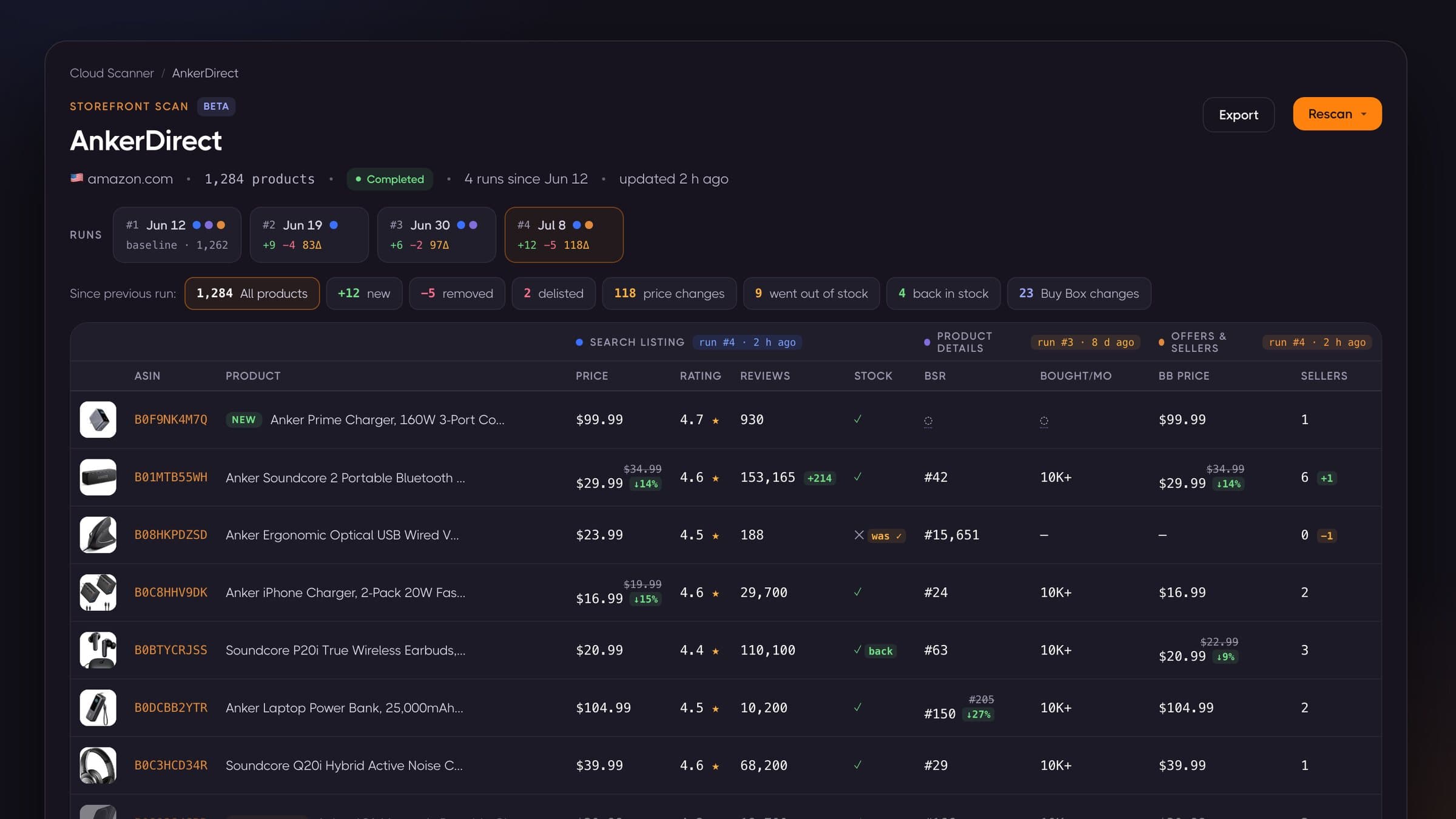
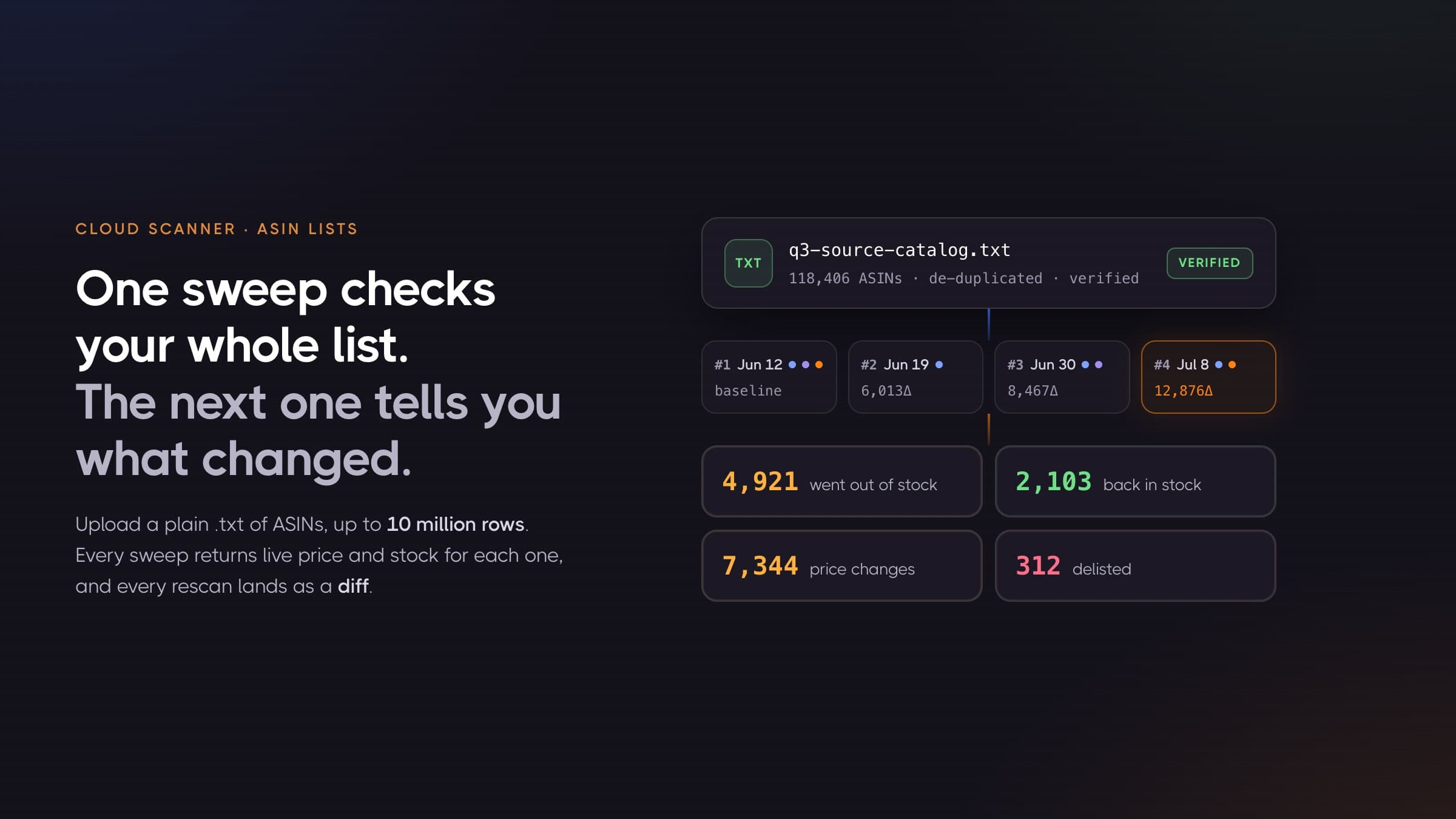
So a scan in Cloud Scanner isn't a frozen result. It's a tracked list of ASINs you can re-run whenever you want. Each run records a full diff against the run before it.
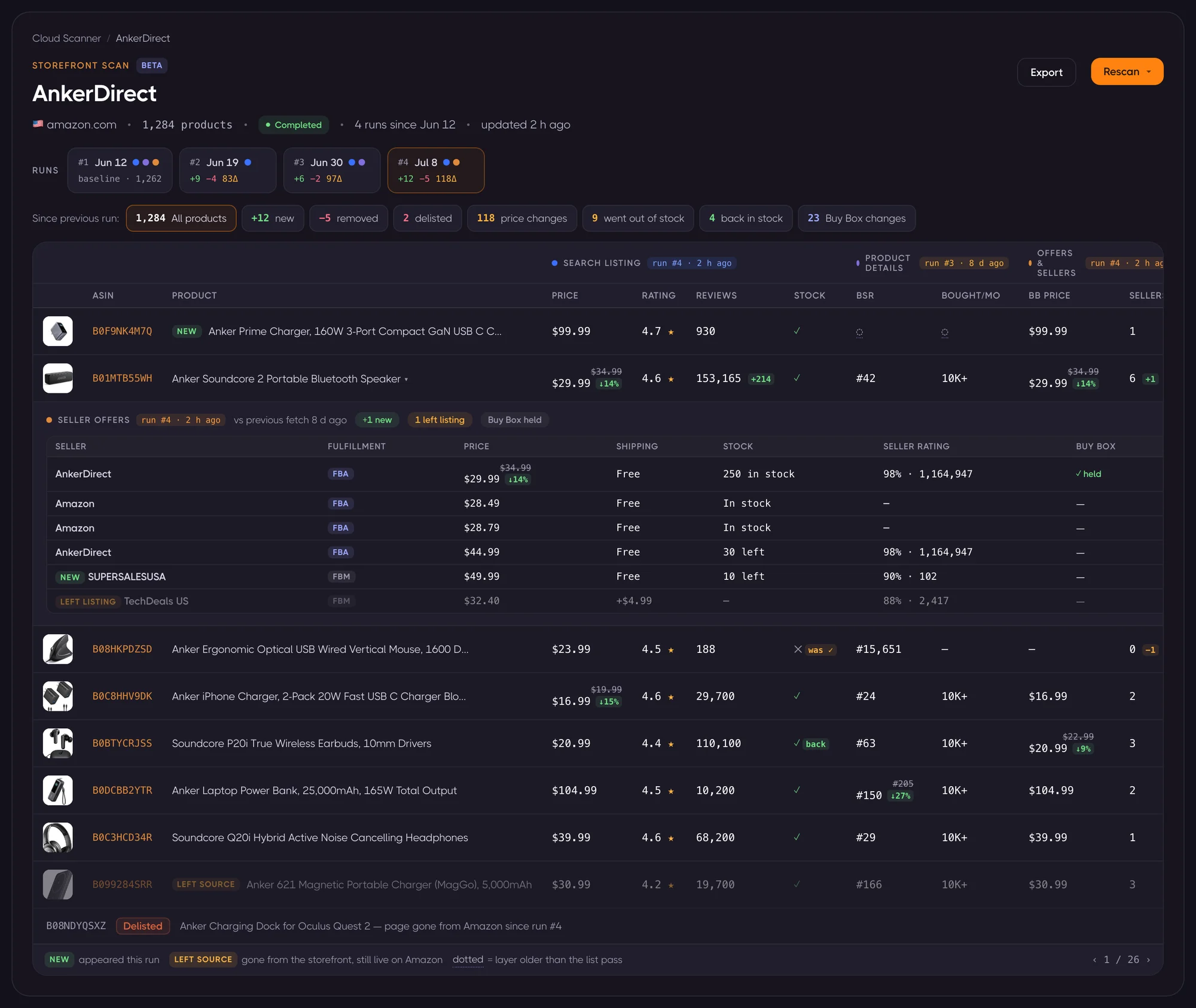
The table always shows the latest known value for every product. History arrives as an overlay: a run strip along the top, a change digest that filters, and delta chips inside individual cells. Each chip shows the previous value struck through, the new one beside it, and the percentage move.
The eight change signals
Every rescan computes exactly eight aggregate change classes:
| Signal | What it means |
|---|---|
| new | Appeared in the latest list pass; wasn't in the previous one |
| removed | No longer returned by the storefront, but possibly still live on Amazon |
| delisted | The product page itself is gone from Amazon (a "dog page") |
| price changes | Listing price moved between runs |
| went out of stock | In stock last run, out of stock now |
| back in stock | The reverse |
| Buy Box changes | The Buy Box holder flipped, or its price moved |
| BSR changes | Best Sellers Rank moved (details layer) |
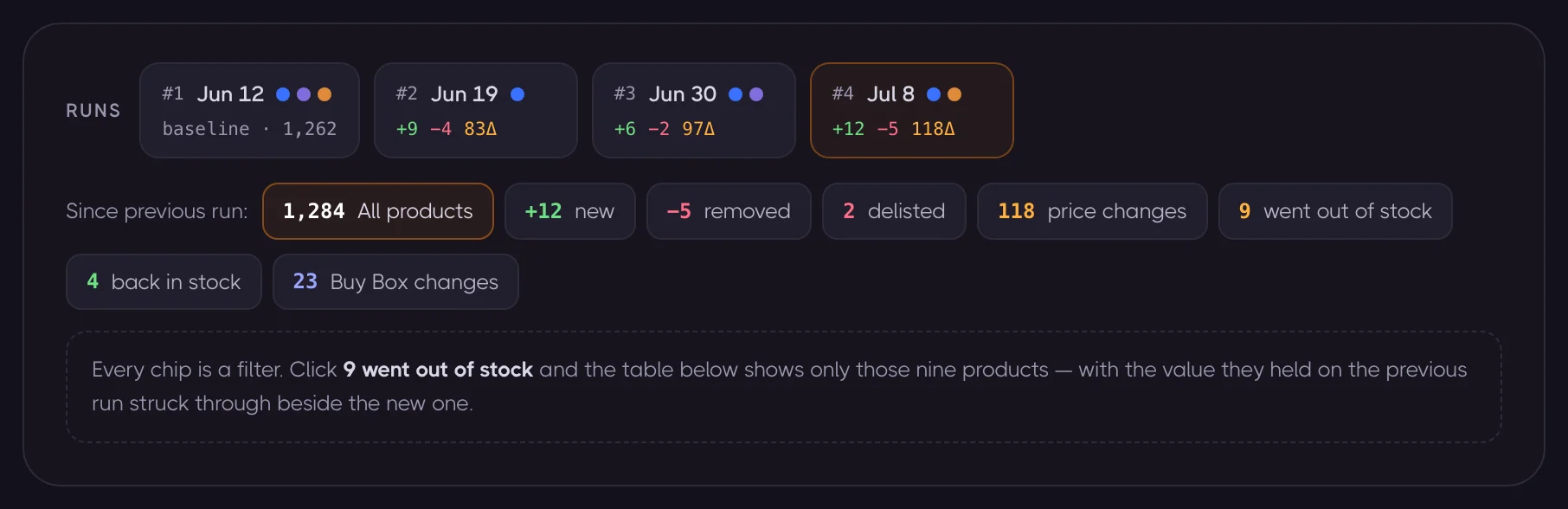
Each chip is a filter. Click 9 went out of stock and the table narrows to those nine products.
Two design details matter more than they look:
"Removed" and "delisted" are different things, and the distinction is worth money. A removed product left the storefront but its Amazon page is fine: the seller chose to stop listing it, which is a sourcing signal. A delisted product's page is gone entirely. The listing died. Tools that lump these together tell you nothing.
Membership diffs are suppressed when they'd lie. If either list pass didn't run to full coverage, "appeared" and "removed" counts would read a partially-scanned catalog as a mass exodus. In that case the scanner hides those two counts rather than showing you a confident wrong number. Price, stock and delisting diffs are status-based and always reported.
Layers refresh independently
A storefront scan has three data layers, and each carries its own "as of run #N" freshness. You can refresh them separately:
- Search listing: membership, price, rating, reviews, stock. Cheap.
- Product details: BSR, brand, category, Buy Box price, seller count, bullets, dimensions, UPC/EAN.
- Seller offers: every seller on the listing, with price, shipping, stock quantity, FBA/FBM and seller rating.
Refresh only the listing layer and you get membership and price movement for a fraction of a cent per product. Refresh offers too and you get the competitive picture underneath each listing.
Who joined, who left, who took the Buy Box
Expand any row and the offers panel shows the seller-level diff against the previous offers fetch: sellers who joined the listing, sellers who left it, sellers who switched from FBM to FBA, price and shipping moves, stock-quantity changes, and whether the Buy Box was held or lost.
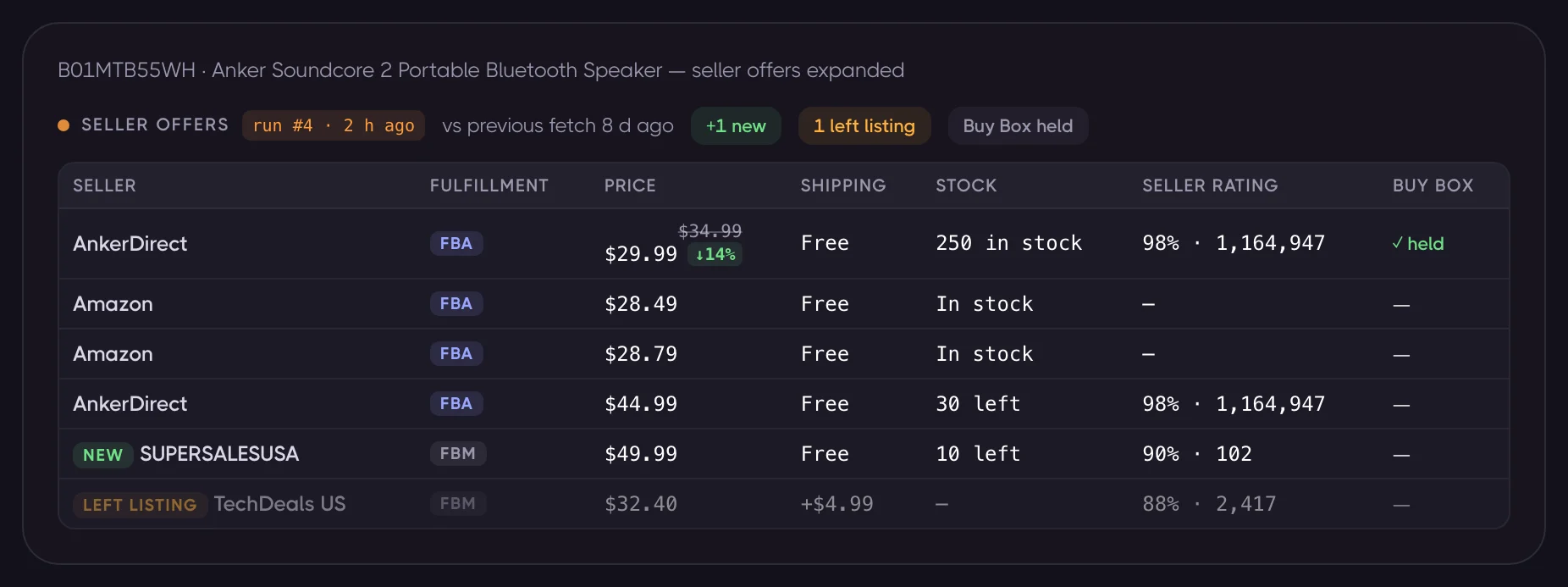
For brand owners, this is MAP monitoring that arrives by itself. For arbitrage sellers, it's the difference between "this ASIN looks good" and "this ASIN just went from six sellers to two, and the Buy Box price is up 14%."
What it costs to scan and rescan an Amazon storefront
Cloud Scanner bills per delivered record, in credits, from a one-time pack. There is no subscription and no per-store fee.
| Layer | Credit cost |
|---|---|
| Search listing (storefront, brand, ASIN list) | 1 credit per 10 products |
| Search listing (keyword, category, best-sellers) | 1 credit per 20 products |
| Product details | 1 credit per product |
| Seller offers | 1 credit per offer page (≈10 offers) |
And the packs:
| Pack | Credits | Price | Per 1,000 | Valid for |
|---|---|---|---|---|
| Starter | 10,000 | $12 | $1.20 | 30 days |
| Small | 30,000 | $29 | $0.97 | 30 days |
| Standard | 100,000 | $79 | $0.79 | 60 days |
| Large | 300,000 | $199 | $0.66 | 90 days |
| Bulk | 1,000,000 | $650 | $0.65 | 180 days |
Work the arithmetic on a shallow storefront scan and it's startling. At 10 products per credit, 100,000 credits covers a million delivered product rows. The $79 pack, in other words, buys:
| Storefront size | Credits per full list pass | Cost inside the $79 pack |
|---|---|---|
| 1,000 products | 100 | ~$0.08 |
| 10,000 products | 1,000 | ~$0.79 |
| 100,000 products | 10,000 | ~$7.90 |
Scanning a 100,000-listing storefront costs roughly $7.90. Rescanning it every week for the pack's entire two-month life uses eight runs, 80,000 credits, and still fits inside that single $79 pack.
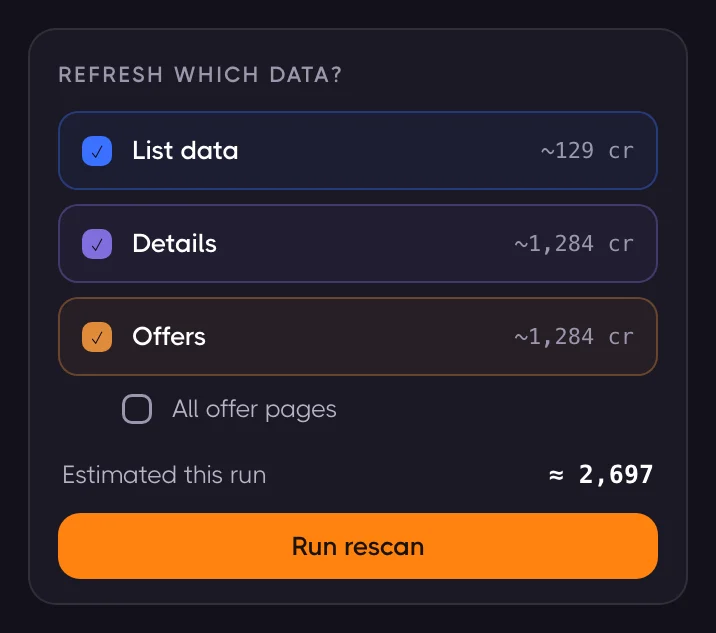
Before every rescan you see the estimate, per layer, and decide what you're paying for. Refreshing the listing layer on a 1,284-product storefront costs 129 credits: about ten cents.
Three honest caveats, because pricing pages tend to omit them:
- Details and offers are 1 credit each, not 1-per-10. Enriching all 100,000 products of that storefront with BSR and Buy Box data would consume the whole 100,000-credit pack. Depth costs; breadth is nearly free. Most storefront-monitoring workflows only need depth on the rows the digest flagged.
- Variation children count as delivered rows. Storefront scans expand sampled variation siblings, so a store that displays 100,000 tiles may deliver more than 100,000 rows. Treat 10,000 credits as a floor, not a quote.
- Credits expire and are forfeited. The $79 pack is valid for 60 days from purchase. The $7.90 figure is the amortised rate inside that pack; a standalone 10,000-credit purchase is the $12 Starter pack.
You can queue up to 100 storefronts in a single scan job.
Who actually uses an Amazon storefront scanner
Reverse sourcing / online arbitrage. Find sellers whose model matches yours, extract their whole catalog, then let the weekly rescan hand you their new ASINs. This is the classic "storefront stalking" workflow, and the new-product digest is the payoff.
Brand protection and MAP enforcement. Scan your own brand's ASINs, refresh offers, and read the seller-level diff: who joined your listings, who's underpricing, who switched to FBA to fight for the Buy Box.
Category and competitor intelligence. Track ten competitors' full catalogs. The removed-products list is the most under-used signal in Amazon research: it's every product a competitor tried and abandoned, which is a free read on what didn't work.
Restock and stock-out sniping. "Went out of stock" on a competitor's listing is a demand signal with a clock on it.
Storefront stalking tools: Stalker Pro, Stealth Seller, and the rest
The dedicated storefront-stalking category is small. Storefront Stalker Pro is the best-known entrant, and it's genuinely good at the job it picked. In its own words, it "allows you to automate the process of reverse sourcing storefronts… You will be alerted every time new ASINs are added to the storefronts you're stalking."
That sentence is also the boundary. It is a new-ASIN alerting tool, priced by how many stores you watch, and it refreshes on a fixed 4-hour cadence, which is a real advantage if new-product alerts are all you want: nothing is on-demand about it. Its published tiers, as of July 2026, are Entry $15/mo (3 stores), Basic $40/mo (10), Professional $70/mo (20) and Elite $140/mo (40), with a 7-day trial and 20% off annual. One naming note: its maker now also sells the same engine as Tactical Expander Lite, marketed as "formerly Stalker Pro" and built around Tactical Arbitrage integration, so searching for the tool today turns up both names.
| Storefront Stalker Pro | Cloud Scanner | |
|---|---|---|
| Core job | Alerts when a tracked store adds an ASIN | Extracts the full catalog, diffs any run against the previous one |
| Priced by | Storefronts tracked | Delivered product records |
| Entry cost | $15/month | $12 one-time (10,000 credits) |
| Refresh | Automatic, every 4 hours | On demand |
| Change signals | New ASINs | New, removed, delisted, price, out of stock, back in stock, Buy Box, BSR, plus per-seller offer diffs |
| Full-catalog export | Not the stated purpose | CSV / Excel, whole store or filtered |
Stealth Seller is the other specialist, and it leans hardest on the storefront-stalking vocabulary. It's a monitoring feed: $38/month watches 50 sellers, $98 watches 200, $298 watches 600, and each new posting arrives with price, sales rank and a Keepa chart attached. As a new-product radar across hundreds of stores at once, that's a real strength, and more stores than Cloud Scanner is built to babysit. What it doesn't advertise is everything else in the diff: full-catalog extraction, removals, price and stock movement on products already listed, or anything at the per-seller offer level.
Elsewhere in the market, the closest thing to a true competitor is Seller Assistant's Seller Spy: paste a storefront URL, it pulls the seller's full catalog every day and gives you a changes view of products added and removed. It's a $9.99/month add-on, and if a daily added/removed feed is all you need, it's a fair deal. What it doesn't give you is the rest of the diff: price moves, stock-outs, Buy Box flips, and the seller-by-seller offer changes underneath each listing.
Further out: Keepa's seller lookup returns a stored asinList of up to 100,000 ASINs per seller, though a single live storefront query refreshes only about 2,400 of them. SmartScout exposes seller catalogs from its own warehouse, with the Sellers Database starting at $97/mo. Chrome extensions like SellerAmp's ASIN Grabber or Helium 10's Xray will annotate or one-shot-grab a storefront page, but none of them re-scan and diff it over time.
And if you'd rather build it yourself: on published July 2026 pricing, 100,000 Amazon product records runs about $150 on Bright Data pay-as-you-go ($1.50 per 1,000 records), or roughly $50 in usage on Oxylabs, whose Amazon rate starts at $0.50 per 1,000 results on a $49/month plan. That's the raw fetching bill, before you solve any of the problems above and before you build anything that diffs two runs. If raw data is genuinely what you want, that's what the ASINSpotlight API is for.
Frequently asked questions
What is Amazon storefront stalking? Watching another seller's storefront to source what they sell and catch what they change: new products, removed products, price moves, stock-outs. The catch is that a storefront page only ever shows a bounded, shifting sample of the store, so stalking through the front door means watching a sliver and guessing about the rest. Doing it properly means extracting the full catalog once, then rescanning it so the changes come to you.
How many products can an Amazon storefront actually show? It depends on the store and the entry, and that's the trap. The default view we measured in July 2026 stopped at 20 pages and 306 products. Other entries page much deeper, but in our testing they eventually recycle products you've already seen instead of continuing the catalog, while claiming full pages the whole way. No view pages through to completeness, and Amazon never reports what fraction you saw. Seeing the rest of the catalog takes a tool that doesn't try to page through the storefront at all.
Can you export an Amazon seller's entire product list to CSV? Yes. Cloud Scanner exports the whole scan or just the filtered view, as CSV or Excel, with per-field column selection and an option to emit one row per seller offer.
Does the scan include out-of-stock products? Yes. Amazon hides them from storefront pages by default; the scanner asks for them explicitly.
Can it handle a storefront with 100,000+ listings? That's the case Cloud Scanner was built for. Cost scales linearly and gently: at 10 products per credit, a 100,000-product pass is 10,000 credits.
How do I see what a competitor removed from their store? Run the scan, run it again later, then click the removed chip in the change digest. Note the distinction from delisted: removed means they stopped selling it, delisted means Amazon's page is gone.
Is storefront stalking against Amazon's Terms of Service? Two separate questions get tangled here. On the law: US courts have held that automated collection of publicly accessible pages is not "unauthorized access" under the Computer Fraud and Abuse Act. The Ninth Circuit said so in hiQ Labs v. LinkedIn and reaffirmed it in 2022 after the Supreme Court narrowed the CFAA in Van Buren. On the terms: Amazon's Conditions of Use grant only a limited licence to use the site and expressly exclude data mining and use of robots. Breaching a website's terms is a contract matter, not a crime, and Amazon's practical remedy is to block or rate-limit you. Cloud Scanner reads only public pages and never touches an account. None of this is legal advice. If the answer matters to your business, ask a lawyer.
Does a rescan cost the same as the first scan? At the listing layer, yes: it's the same per-product rate. But you choose the layers. A membership-and-price refresh of a 1,284-product store is 129 credits; re-fetching every product's details and offers on top of that is 2,697.
Storefront research has always been an exercise in guessing from whatever sample Amazon felt like serving, and hoping it was representative. It doesn't have to be.
Cloud Scanner is in beta and available now. See how it works, or run your first scan. Credit packs start at $12, and there's no subscription to cancel.
Latest articles
Amazon Deals API: How to Track Lightning Deals, Coupons, and Discounts Programmatically
Bulk Amazon Stock Checker: Scan a Million-ASIN List, Then See What Changed