Amazon Deals API: How to Track Lightning Deals, Coupons, and Discounts Programmatically
Amazon renders a deal badge only while a promotion is live, and our Scraping API now returns it with the deal ID, the exact end time, and the struck-through reference prices. One request answers whether a discount is still running. Here is how Amazon promotions work, what the API returns, and what you can build with it.
Every Amazon discount raises the same question sooner or later: is it still running? A repricer wants to know whether the competitor's price is a real repositioning or a 10-hour Lightning Deal. A deal-alert channel wants to post the discount while it exists, not an hour after it dies. A sourcing tool wants to know whether the "33% off" it found yesterday will survive until the purchase order lands.
Until now, answering that question programmatically meant scraping a product twice and comparing prices, and even that could not really answer it. A price that went back up might mean the promotion expired, or the seller repriced, or the Buy Box moved to another seller. The three cases look identical in a price series and mean completely different things.
Amazon itself displays the answer on every product page: a deal badge that exists only while the promotion is live. The ASINSpotlight Scraping API now extracts that badge, its type, Amazon's own deal ID, the exact end time, and the struck-through reference prices the discount is measured against, on product pages and on every search, category, and bestseller result. This article covers how Amazon promotions work, what the new promotion data looks like, and what you can build on top of it.
The types of Amazon deals and promotions, explained
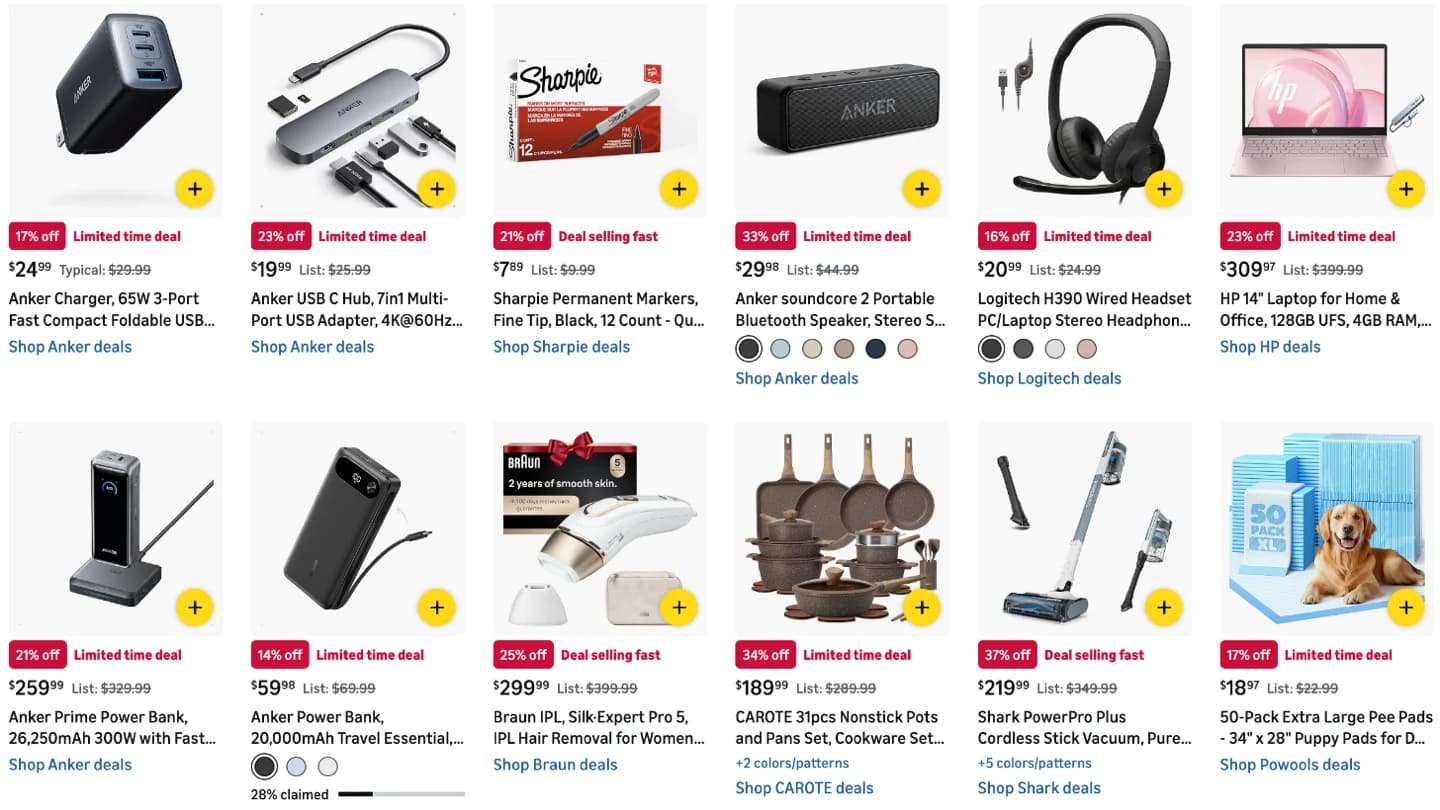
Amazon runs several distinct promotion mechanisms, and they look different on the page, which matters when you want to detect them:
- Limited time deals (Best Deals). The workhorse. A red "Limited time deal" badge above the price, a percent-off figure, and a struck-through reference price. These run in windows of up to a couple of weeks and populate most of Amazon's Today's Deals page.
- Lightning Deals. The short-fused variant: a countdown badge ("Ends in 10:02:30") and a "% claimed" progress bar, usually gone within hours. Quantity is capped, so a Lightning Deal can end early by selling out its allocation.
- Deal of the Day. A 24-hour featured slot on the Deals page, typically with the same badge anatomy as a limited time deal.
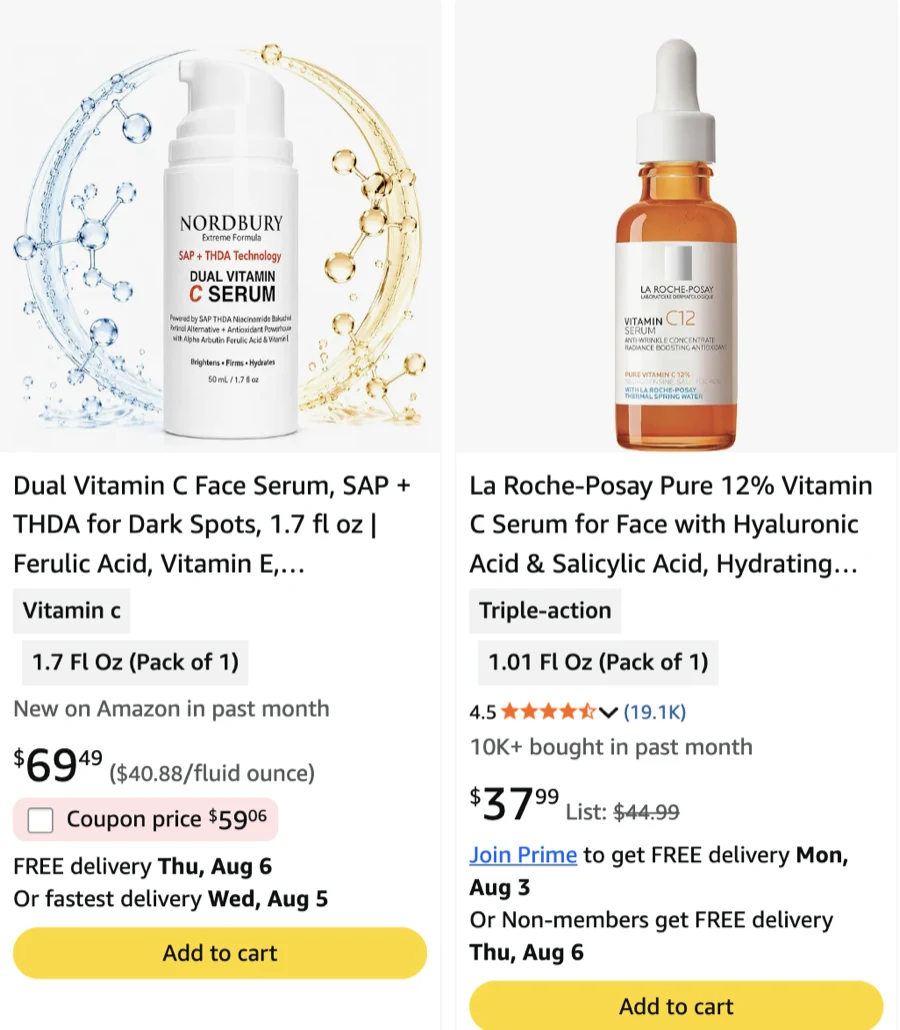
- Coupons. A separate mechanism entirely: a clip-to-apply voucher ("Save $10 with coupon", or a "Coupon price" checkbox on search results) that discounts at checkout. A product can carry a coupon and a deal at the same time.
- Prime Exclusive Discounts. A price cut only Prime members see, rendered with its own badge wording.
- Event deals. During Prime Day or Black Friday the badges change wording ("Prime Day Deal", "Black Friday Deal") but behave like time-boxed deals.
- Everyday strikethrough discounts. No badge at all: just a current price shown against a struck-through "List Price:" or "Typical:" reference. This is the quiet, permanent markdown that never appears on any deals page.
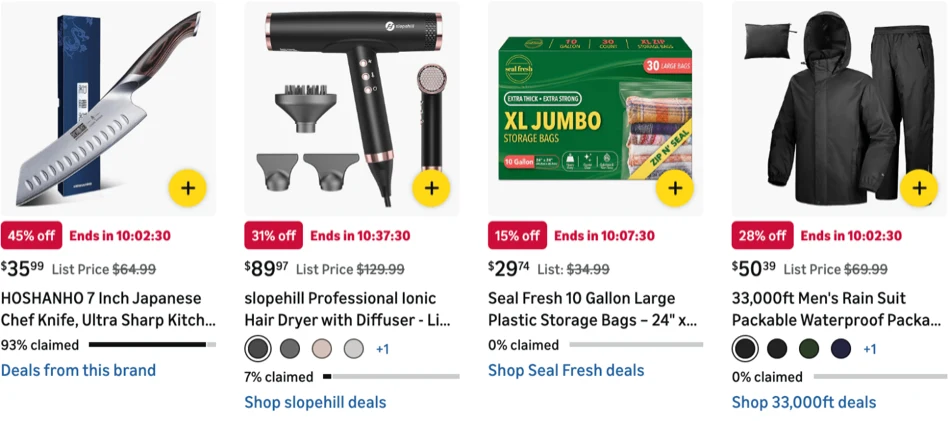
Two details are easy to miss. First, the badge and the strikethrough are independent: a product can be struck through with no badge (an everyday markdown), and a badged deal does not have to show a reference price. Second, the reference price itself is not always a list price. When Amazon has no manufacturer's list price to show, it fills the same slot with a "Typical:" price, a median price, or a former price, and only the label text tells you which one you are looking at.
Why sellers run deals, and why they vanish overnight
Sellers do not run promotions out of generosity. A deal buys three things:
- Velocity and rank. A discount spikes the sales rate, and the sales rate feeds Best Sellers Rank and organic position. Many launch playbooks are built around a deal window that pushes a new product over the cold-start hump.
- Deals-page traffic. Lightning Deals and Best Deals appear on Amazon's Today's Deals page, one of the highest-traffic surfaces in all of e-commerce. That placement is the real product; the discount is the ticket price. Amazon charges a fee for running these deals.
- Inventory discipline. Overstock ages into long-term storage fees. A deep deal that clears stranded inventory is often cheaper than storing it another quarter.
The same economics explain why deals disappear without warning. The scheduled window closes. A Lightning Deal sells out its claimed allocation hours ahead of schedule. A seller cancels mid-flight because margin went negative. Amazon revokes eligibility when the offer price drifts. The result, from the outside, is a discount that was there at breakfast and gone by lunch, which is exactly why polling prices was never a reliable way to track promotions.
How to check if an Amazon deal is still active
Amazon only renders the deal badge while the promotion is live. That turns a hard inference problem into a lookup: fetch the product once and read whether the badge is there.
The /v1/product endpoint now returns a promotion object with exactly that information:
"promotion": {
  "deal": {
    "kind": "limited_time",
    "label": "Limited time deal",
    "deal_id": "amzn1.deal.b12c9bd2",
    "ends_at": "2026-08-16T04:00:00Z",
    "ends_on": "2026-08-16",
    "ends_in_days": 15,
    "ends_on_text": null
  },
  "list_price": {
    "amount": 44.99,
    "label": "List Price:",
    "savings_amount": 15.01,
    "savings_percent": 33.0
  },
  "lowest_price_30_days": null
}
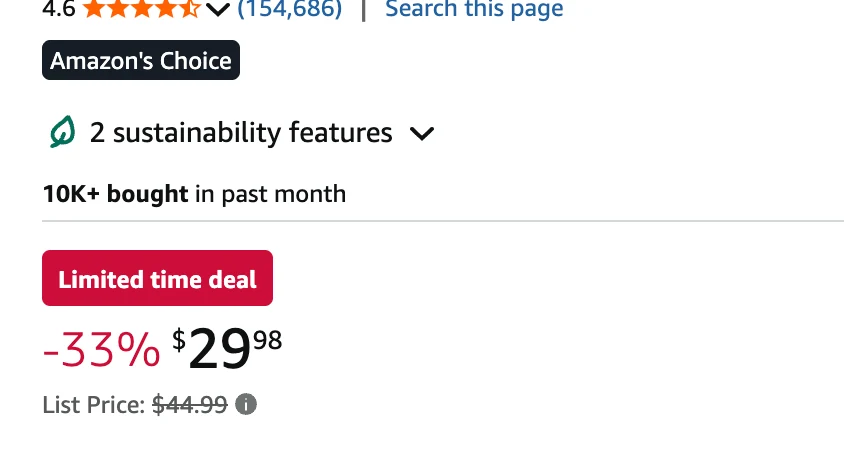
Reading it is straightforward:
promotionisnull: the product is selling at its normal price. No badge, no strikethrough.dealis present: a promotion is live at the moment of the fetch.kindnormalizes the badge intolimited_time,lightning, orprime_exclusive, and staysnullfor badges that name an event instead of a mechanic ("Black Friday Deal") or show only a countdown. The verbatim badge text is always inlabel, in the page's language.deal_idis Amazon's own promotion identifier (amzn1.deal.*). It is stable for the lifetime of one deal and shared across the ASINs that deal covers. This is the field that answers the subtle version of the question: if the same product is discounted next week at a similar price, a changeddeal_idtells you the old promotion ended and a new one started. Price history cannot make that distinction at all.ends_atis the exact expiry moment as a UTC timestamp, read from machine-readable data on the page rather than parsed out of localized text.ends_onandends_in_daysgive you the same deadline as a calendar day and a day count, andends_in_days: 0means the deal ends today.list_priceandlowest_price_30_dayscarry the struck-through reference prices with the savings amount and percent. When Amazon renders its own percent-off figure, that figure is reported, because it is what the shopper sees. On EU marketplaces,lowest_price_30_daysis the 30-day minimum that the Omnibus Directive obliges storefronts to display next to a discount; outside the EU it is absent.
The savings math is defensive by design: a reference price at or below the current price is not a discount, so savings_amount comes back null rather than zero or negative. Inflated-list-price theater does not get reported as savings.
Deal badges on search results, categories, and bestsellers
Promotion data is not limited to product pages. Every entry in a search, category, or bestseller response carries the same promotion object in a lighter form: the badge (kind, label) and the struck-through reference price are there, while deal_id and the deal-terms sentence are not, and ends_at appears only for countdown badges that state their own target.
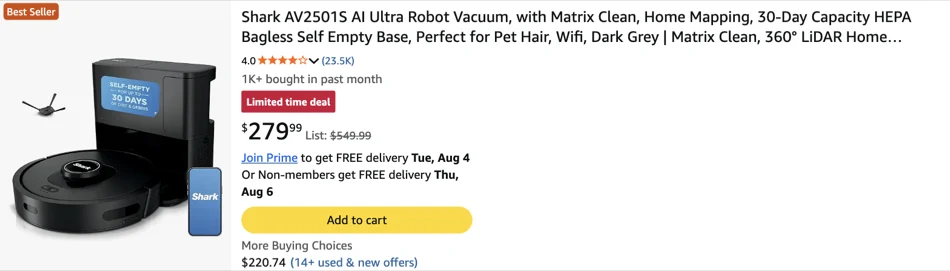
That changes the economics of deal discovery. One search request returns a whole page of results with deal state attached, so "find everything discounted for this keyword right now" is one credit, not fifty. Sweep a category or a bestseller list the same way, then call /v1/product only on the ASINs whose promotion you actually want to identify precisely, where the full object with deal_id and ends_at is waiting.
Coupons are their own field
Clip coupons work differently from deals, and the API keeps them separate. Both product data and list entries carry a coupon field with the discount as Amazon states it:
"coupon": { "unit": "currency", "value": 10.43 }
unit is percent or currency, so a "Save 15% with coupon" and a "$10.43 off" coupon are both machine-readable without parsing label text. A listing can carry a coupon and a deal badge simultaneously, and treating them as one "discount" loses real information: the deal expires on a clock, while the coupon runs on the seller's budget and can die the moment that budget is spent.
One honest limitation: the API reports what the product page shows. Checkout-level mechanisms that never render on the page, like social media promo codes, are not detectable from page data, on our API or anyone's.
What you can build with Amazon promotion data
The promotion object is a small structure, but it slots into a surprising number of workflows:
- Deal trackers and alert channels. Poll a watchlist, alert when
dealappears, and include the real deadline fromends_atin the alert instead of "hurry". A changeddeal_idon the same ASIN is a fresh deal and deserves a fresh post; an unchanged one is old news and should not be reposted. - Repricers. A competitor price with an active
lightningdeal behind it is not a price you need to chase, it is a price that self-destructs in hours. Repricing logic that reads the deal state stops burning margin reacting to temporary prices. - Analytics and brand monitoring. Reconstruct a competitor's promo calendar from observed deal windows, measure how often a category's top sellers run deals, or flag resellers whose "discounts" are measured against inflated reference prices. Agencies can audit MAP behavior with the reference price and savings fields instead of screenshots.
- Sourcing and arbitrage. A buy list is only as good as its prices. Deal state tells you whether today's attractive price is structural or a promotion that ends before your inventory would arrive, and
savings_percentagainst a "Typical:" label reads very differently from savings against a real list price. - Cross-market comparison and EU compliance. The same request shape works on all 20 marketplaces, so a comparison engine can show deal state per country, and
lowest_price_30_daysgives EU-facing tools the Omnibus reference straight from the page.
For monitoring whole catalogs on a schedule rather than single lookups, the same promotion data pairs naturally with the workflows described in our bulk stock checking guide.
Build the tracker with AI in an afternoon
The part of this that used to be genuinely expensive was never the idea, it was the scraping: browser fleets, layout drift across 20 marketplaces, badge wording in a dozen languages. With the extraction reduced to a JSON field, the remaining work is a loop and a notification, and that is exactly the kind of code AI assistants write well.
The API ships a complete OpenAPI specification and an AI integration guide written to be pasted into Claude, Cursor, or ChatGPT. A working deal monitor is one prompt away:
Build a deal monitor for a watchlist of ASINs using the ASINSpotlight Scraping API.

OpenAPI spec: https://www.asinspotlight.com/scraping-api-docs/openapi.json
Auth: API key in the x-api-key header (env var ASINSPOTLIGHT_API_KEY).
Endpoint: GET /v1/product?asin=...&marketplace=...

For each ASIN, read data.promotion:
  - promotion is null -> not discounted; clear any stored deal state
  - promotion.deal present -> live deal: store deal.deal_id, deal.ends_at,
    and list_price.savings_percent
  - alert when a deal appears, when deal_id changes on the same ASIN,
    or when ends_at is less than 12 hours away

Persist state in SQLite keyed by (asin, marketplace). Run every 30 minutes.
Do not infer deal endings from price changes; use the promotion object only.
That prompt, the spec, and an API key are the whole project. The same pattern extends to a keyword-level deal scanner (one /v1/search call per keyword, filter entries where promotion is not null) or a category sweep.
Try it on your own ASINs
Promotion data is live on /v1/product and on every list entry returned by /v1/search and POST /v1/scrape, across all 20 supported marketplaces, at no extra cost per request. Every response is fetched from Amazon at the moment you ask, so the deal state you read is the deal state a shopper sees.
The fastest way to evaluate it is to pick three products you know are on a deal right now, fetch them, and diff the promotion object against what the page shows.
The ASINSpotlight Scraping API is live. Run a request in your browser, read the Deals and Promotions docs, and get an API key in minutes.