Bulk Amazon Stock Checker: Scan a Million-ASIN List, Then See What Changed
Upload a plain text file of ASINs (up to 10 million rows), get live price and stock for every one, and rescan on your schedule. Every sweep lands as a diff of what went out of stock, what came back, and what moved.
Every serious Amazon operation eventually owns a list. A source catalog you resell from. A buy list you've been growing for months. A price file your repricer eats. A few thousand ASINs your brand actually cares about. The list is the asset, and it keeps raising the same three questions:
- Which of these are in stock on Amazon right now, and at what price?
- How many ASINs can I actually check in one go?
- What changed since the last time I checked?
The first question is a lookup. The second is where most tools quietly give up: bulk checkers tend to cap out between 10,000 and 100,000 ASINs per batch, and daily quotas often bring the real throughput lower still. And the third question, the one that's actually worth money, usually has no answer at all, because a tool that returns a one-off spreadsheet has no memory.
We built ASINSpotlight's Cloud Scanner ASIN-list scan to answer all three at catalog scale: upload up to 10,000,000 ASINs in one scan, get a live snapshot of every row, then rescan the same list whenever you want and read the result as a diff. This article walks through the whole workflow, with real numbers on what it costs.
Who runs checks like this
The pattern is always "a big fixed list of ASINs, checked periodically," but it shows up in very different businesses:
- Resellers and dropshippers who source from Amazon and sell somewhere else: another marketplace, eBay, their own store. The source catalog drifts silently: products go out of stock, come back, get delisted, change price. Listings that point at a dead source turn into cancellations, and cancellations turn into account health problems. A periodic sweep of the full catalog is the hygiene that prevents it.
- Online-arbitrage and wholesale buyers sitting on accumulated buy lists and lead-service exports. A list that was profitable when you built it goes stale in weeks. Re-checking all of it before you commit an order is the difference between a buy list and a wish list.
- Brand owners and agencies watching a fixed cohort: your own line plus the competitors' equivalents, checked weekly for price moves, stock-outs and Buy Box changes.
- Analysts and tool builders who need availability and price for a defined universe of products on a schedule, exported as a file their pipeline can consume.
If your list fits in a spreadsheet column, it fits here. (If what you want is to discover out-of-stock products you don't have a list of yet, that's a different job: the out-of-stock scan covers it.)
Why most bulk checkers stop at 20,000 ASINs
The established options are genuinely useful, right up to their ceilings. Keepa's Product Viewer imports up to 10,000 codes per batch, with a daily quota on top. Batch-lookup tools typically take 20,000 to 100,000 identifiers per run. Browser-extension stock checkers work one product page at a time. For a 5,000-ASIN buy list, any of these is fine.
At catalog scale the arithmetic breaks. A million-ASIN catalog checked through a 10,000-per-batch tool is a hundred imports, and if a daily quota lets you move 24,000 a day, one full pass takes six weeks. By the time the last batch lands, the first one describes a market that no longer exists.
The Cloud Scanner's list scan was built for exactly this shape of job. One scan takes up to 10 million ASINs, runs in the cloud (close the laptop, it doesn't care), and bills per product checked: 1 credit covers 10 ASINs on the list layer. The rows come back in the order you uploaded them, so the result merges straight back into whatever file the list came from.
Step 1: upload the list, audited before you pay
The scan dialog takes a plain .txt file with one ASIN (or /dp/ product link) per line. Paste works too for smaller lists; both roads lead to the same place, a verified list card that tells you exactly what we read:
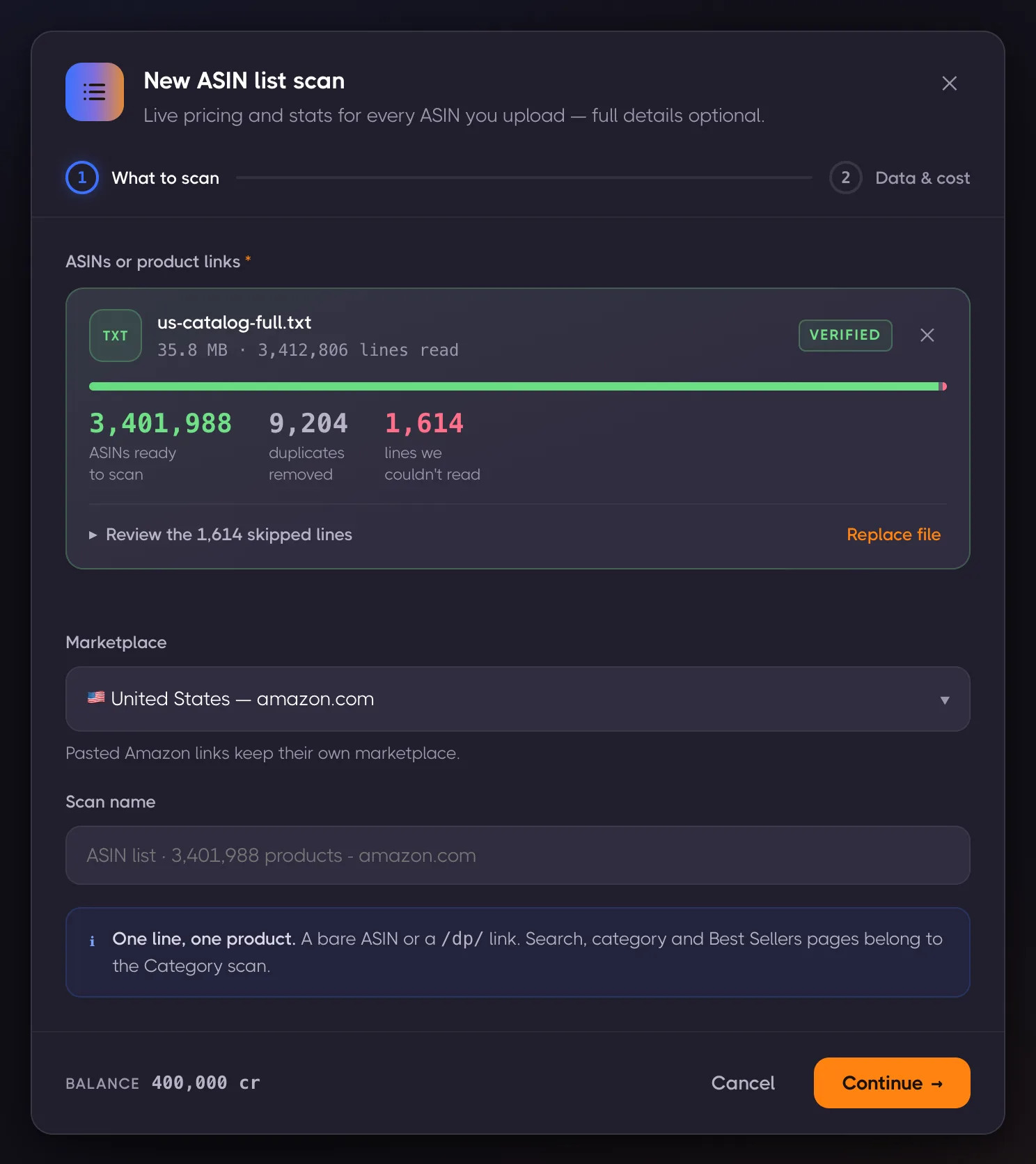
That card is an audit, not a decoration. The identity always holds: ASINs ready plus duplicates plus unreadable lines equals lines read. Duplicates are removed silently but reported loudly, because billing is per unique ASIN and a spreadsheet export with 9,204 repeats would otherwise be 9,204 wasted checks. Unreadable lines are listed with their original line numbers so you can fix the source file instead of wondering why the scan came up short. A 10-million-row file is about 110 MB and parses in seconds, in the browser, before any credits move.
Step 2: pick the depth, see the price
Every list scan collects the list snapshot: one row per ASIN with title, image, price, shipping, coupon, Prime badge, rating, review count, "bought last month," variation signals, and the field this whole article orbits around, in stock or not. Deeper layers are optional: product details (BSR, brand, category, UPC/EAN, dimensions, all variations) and sellers & offers (who sells it, FBA or FBM, stock per offer, Buy Box). Each deep layer costs about ten times the snapshot.
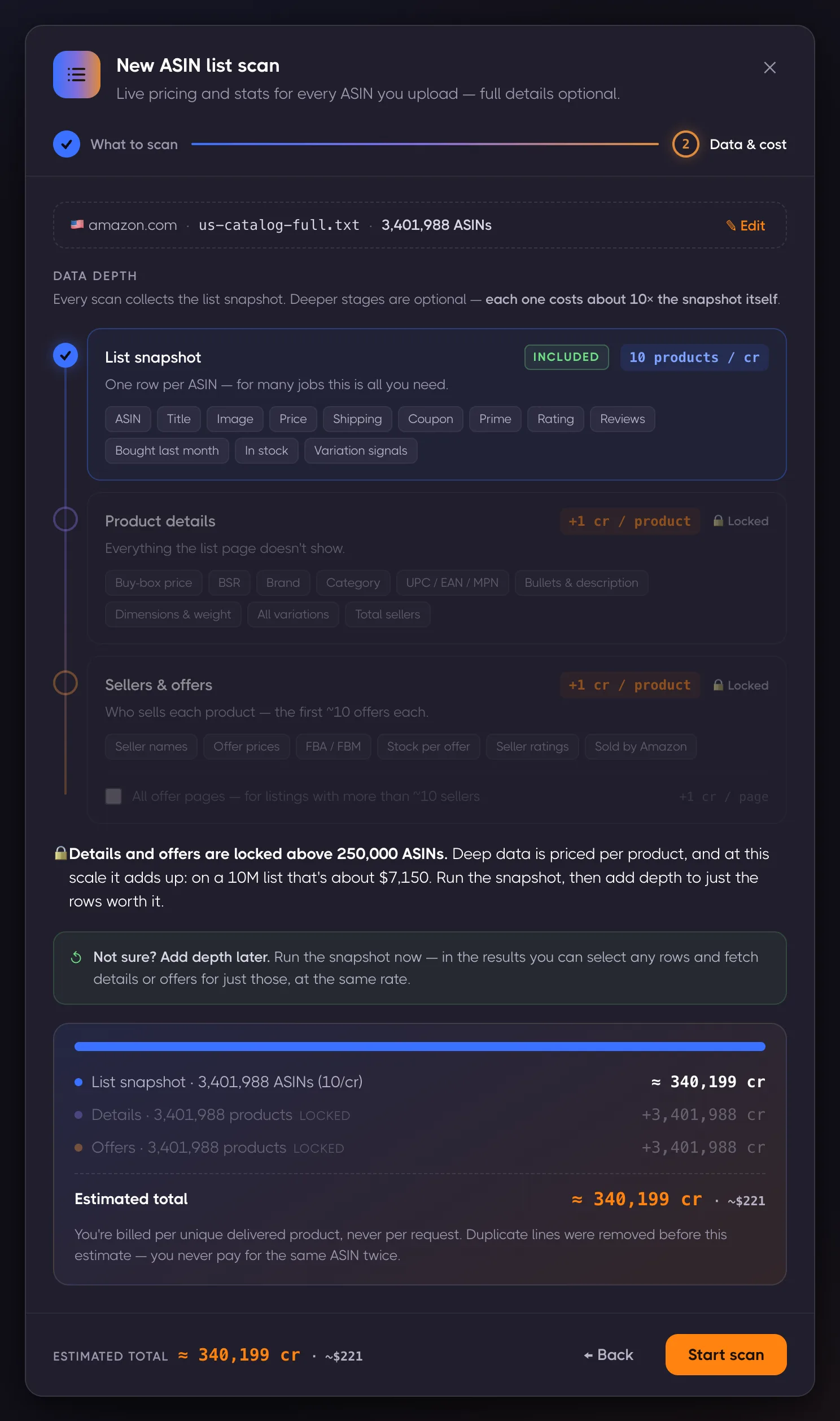
Two honest guardrails are visible right in that screenshot:
- Details and offers lock above 250,000 ASINs. At that scale, deep data stops being an impulse purchase: on a multi-million-row list it runs to thousands of dollars. The snapshot answers the stock-and-price question on its own; you can select any rows in the results afterwards and add depth for just those, at the same rate.
- The estimate converts to dollars once credits stop being legible. 3,401,988 ASINs is 340,199 credits, and 340,199 credits means nothing until it reads about $221. That's the full sweep, not a monthly fee.
The rescan: where the list starts paying rent
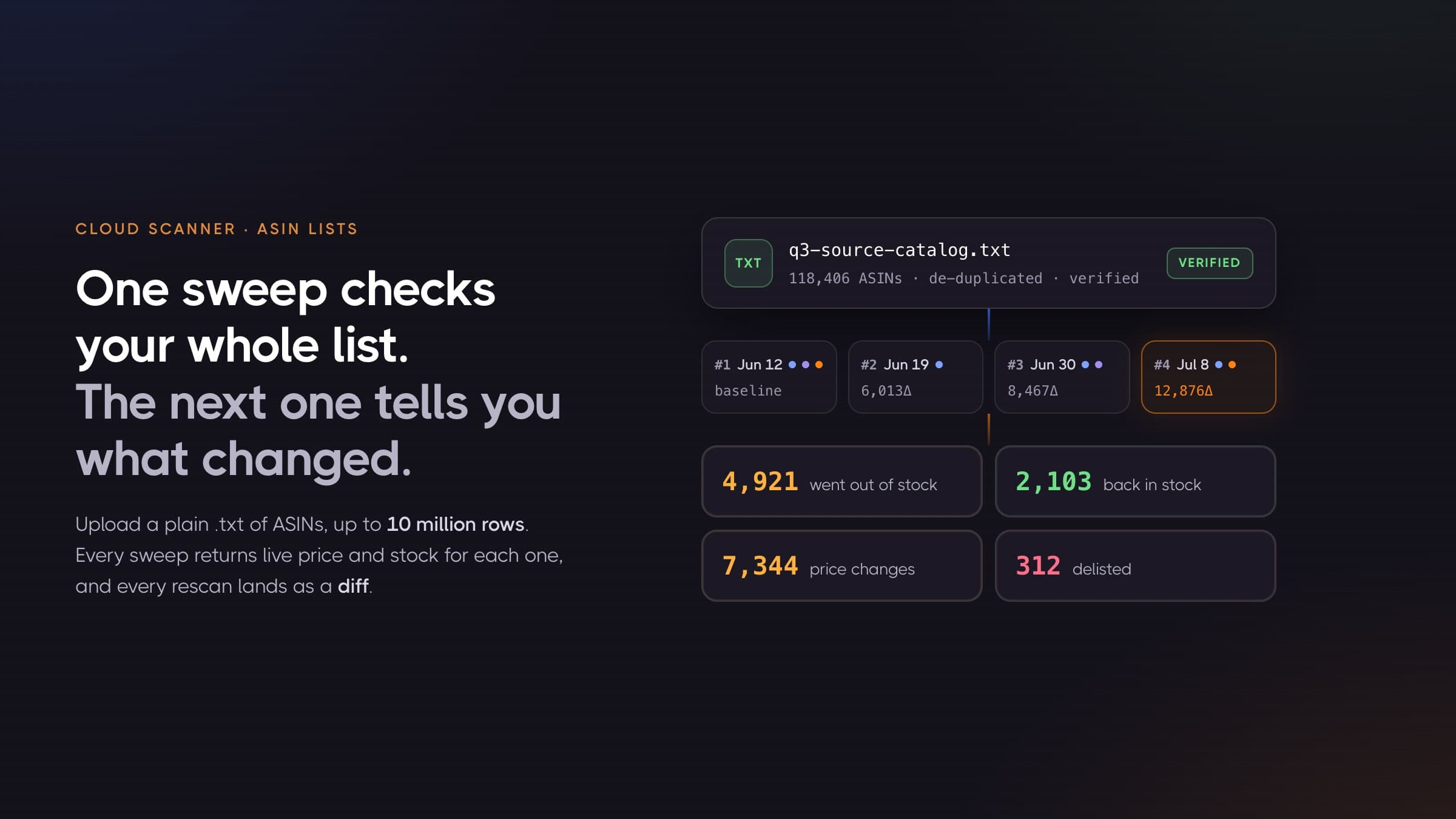
A one-off snapshot answers today's question. The value compounds when you run the same list again, because the second sweep lands as a change digest on top of a living results table:
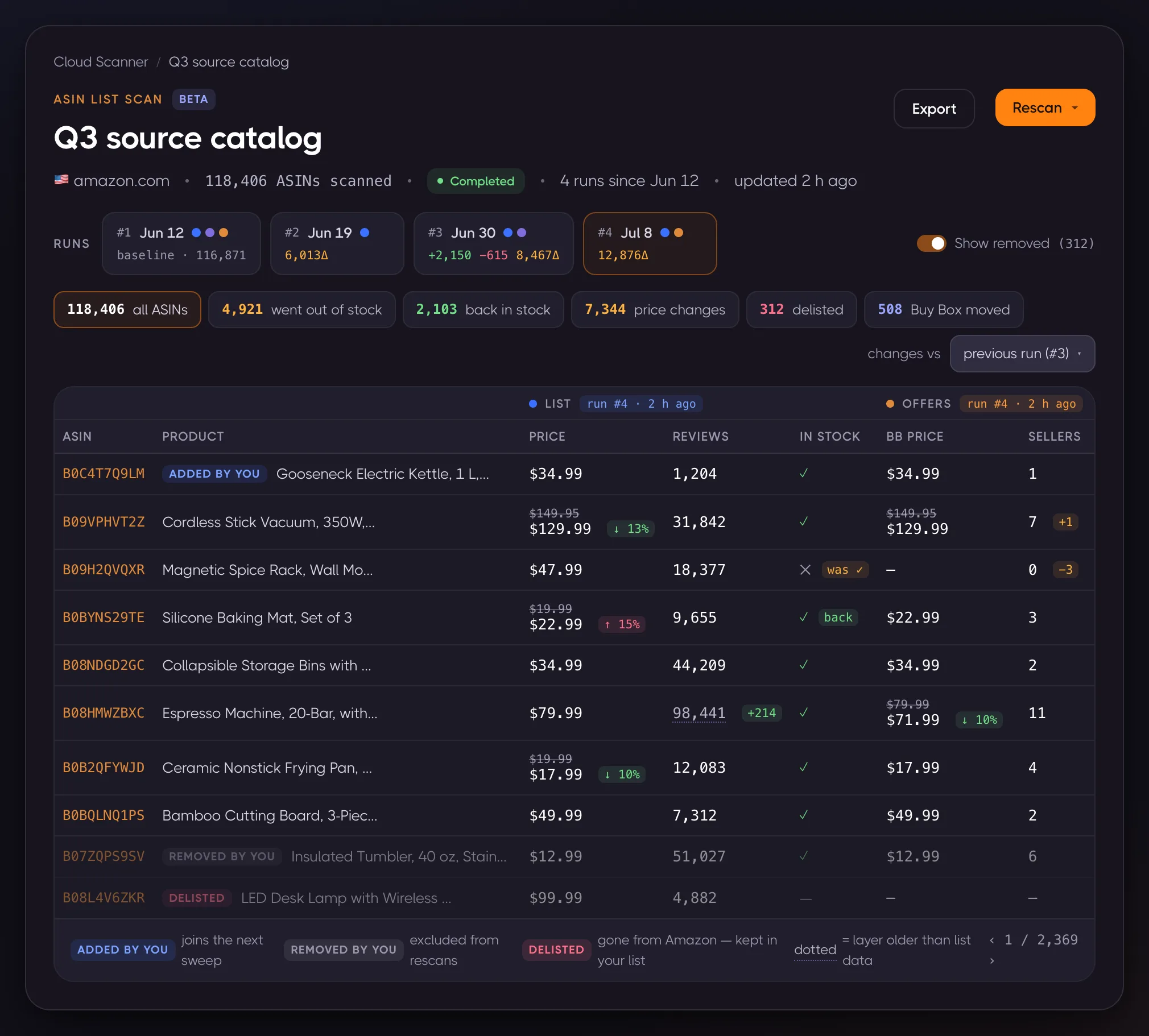
Every chip is a filter. Click 4,921 went out of stock and the table shows exactly those rows; click 2,103 back in stock and you're looking at restock opportunities; 312 delisted is the list of products that are simply gone from Amazon. Changed cells show the old value struck through next to the new one, so a price move reads as "$149.95 → $129.99, down 13%" without opening anything. If you list these products somewhere else, that amber chip is your cancellation risk, enumerated and exportable.
Rescans refresh only the layers you ask for. For pure stock-and-price monitoring, that's the list layer alone, at the same 1 credit per 10 ASINs:
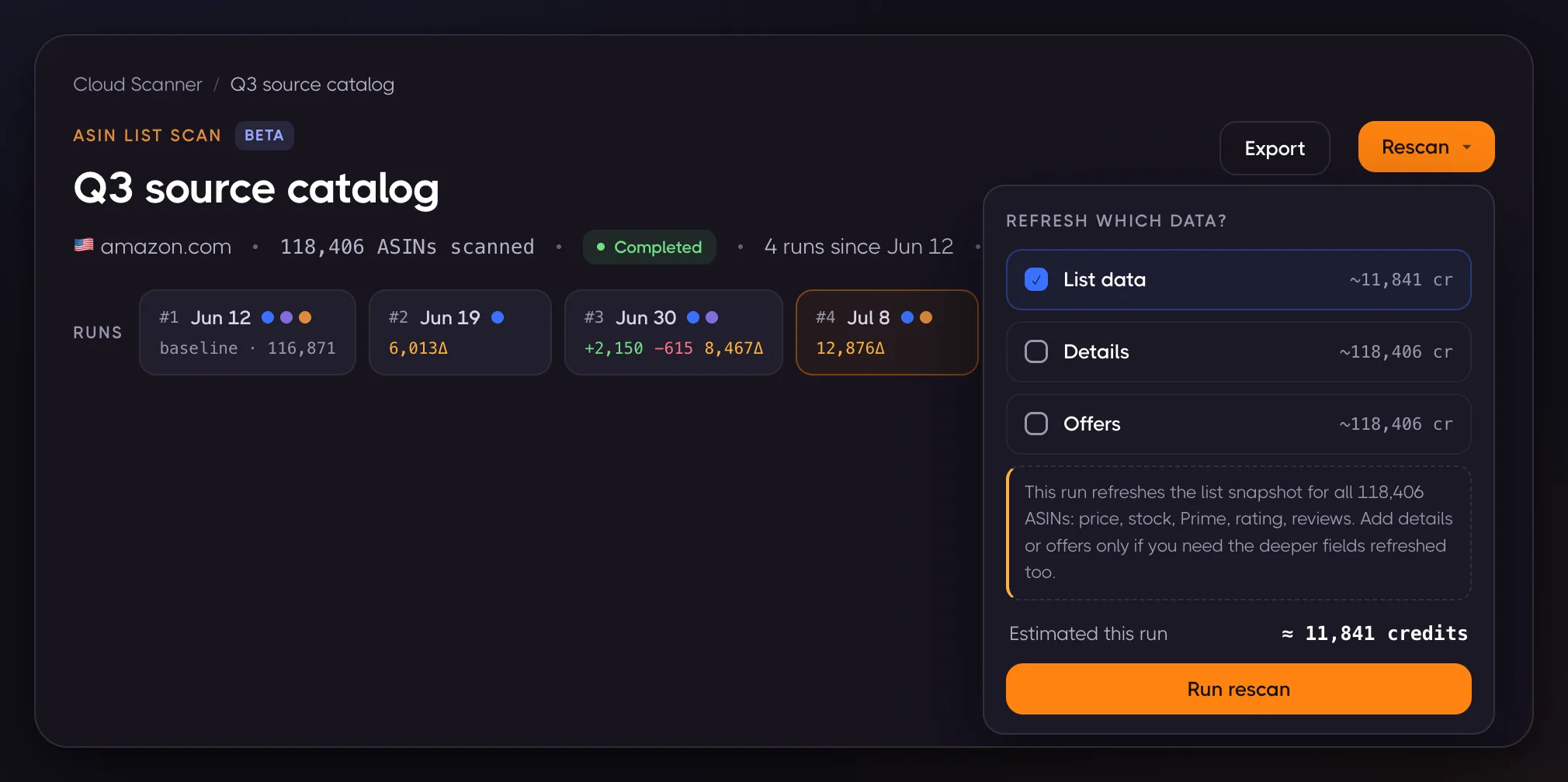
That's the economics of the whole monitoring pattern: a 118,406-ASIN catalog re-checked for 11,841 credits, which is about $14 at the smallest pack rate and closer to $8 at the big-pack rate. Twice-a-month monitoring of a six-figure catalog costs less than a lunch. A diff never bills anything on top; you pay for the scans, the comparison math is free.
And because a failed check is retried and ultimately refunded rather than recorded, a check that didn't happen can't masquerade as "out of stock." Diffs compare values that were actually observed. At a million rows, even a 1% silent failure rate would be 10,000 wrong answers per sweep; this is why we treat "we couldn't check it" as its own state instead of guessing.
Your list, your membership
A storefront scan's membership belongs to Amazon: products come and go as the seller changes their catalog. An ASIN list is different, and the scanner respects that: only you decide what's in it.
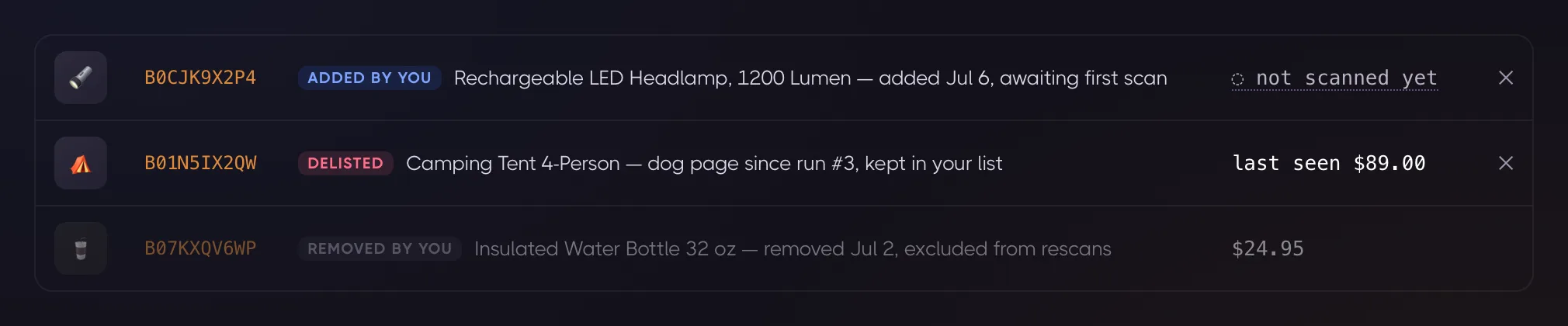
Three lifecycle states make that concrete. ASINs you add between runs join the next sweep. ASINs you remove stop being scanned but keep their history. And a product that turns into a dead page on Amazon is flagged Delisted, with its last seen data, but stays in your list until you say otherwise, because "gone from Amazon" is precisely the signal a catalog owner needs to see, not something to silently tidy away.
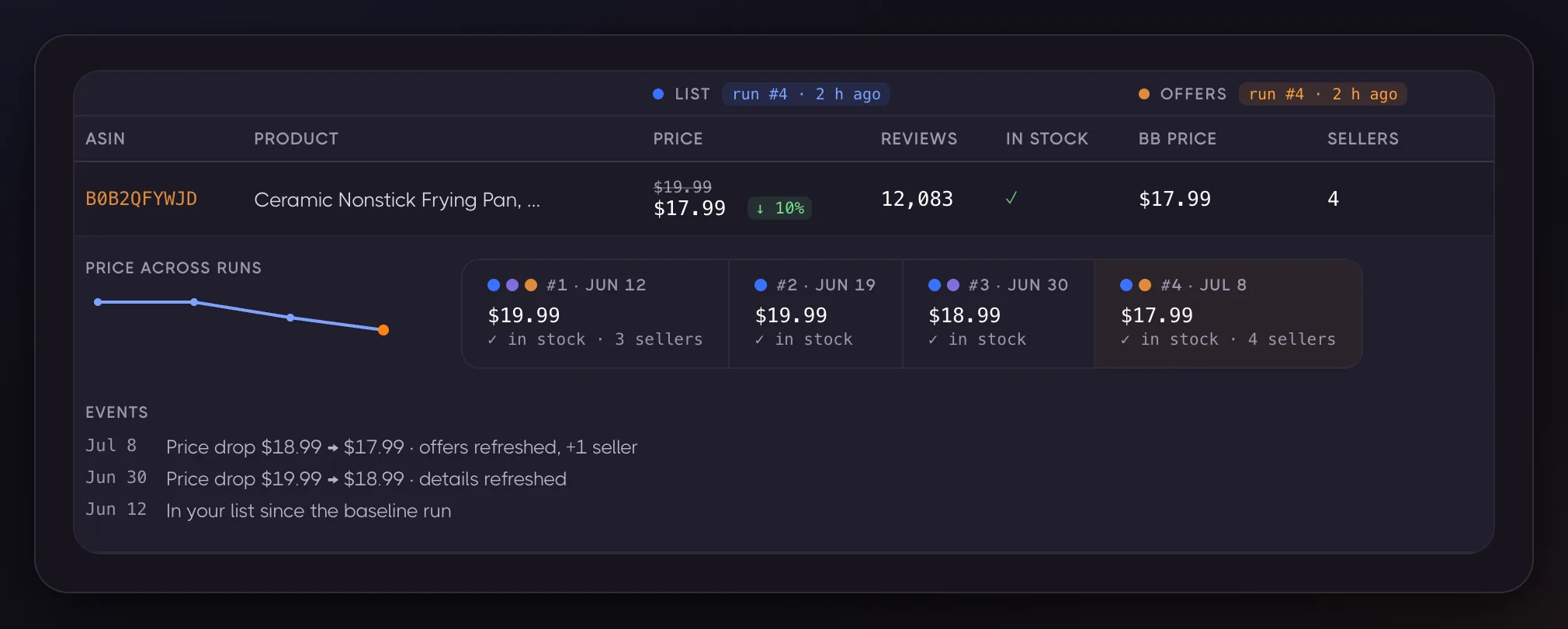
Each row also keeps its own history across runs. Expand a product and you get its price across every sweep, per-layer freshness, and a small event log:
From sweep to your system
The results table is filterable in place (price bands, in-stock, Prime, the change chips), but a list this size usually lives in Excel, a database, or a repricer. Exports stream as CSV at any size, or as XLSX up to Excel's own row limit, and include an Input # column carrying each ASIN's original line position, so the export merges back into your source file with a single sort. Segment exports work too: filter to "went out of stock" and export just that.
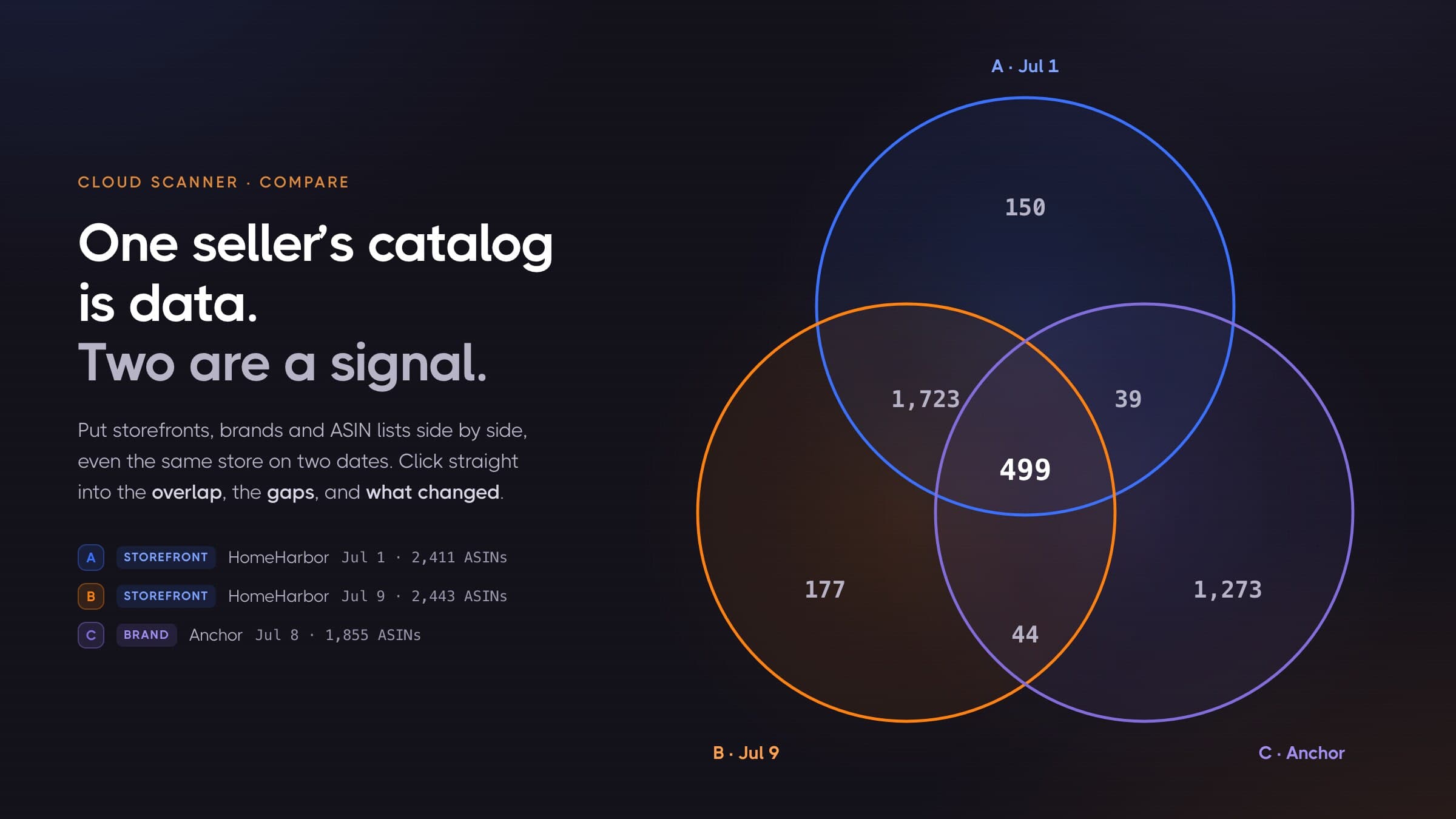
Two runs of the same list (or a list against a storefront, or a brand) can also go into the Compare view: a clickable diagram of the overlap and the differences between any two or three scans, which is the tool for questions like "which of my ASINs does this competitor also carry."
What it costs, in real sweeps
Cloud Scanner bills credits, packs start at $12 for 10,000 credits, and there's no subscription. The list layer covers 10 ASINs per credit, so:
| The list | One sweep | Twice a month |
|---|---|---|
| 25,000 ASINs | 2,500 cr, about $3 | about $6/mo |
| 118,406 ASINs | 11,841 cr, $8-14 | $16-28/mo |
| 1,000,000 ASINs | 100,000 cr, about $65 | about $130/mo |
| 10,000,000 ASINs | 1,000,000 cr, about $650 | about $1,300/mo |
Those prices are the big-pack rate for the big lists and the small-pack rate for the small ones; the exact figure sits in the estimate before you press anything. For perspective: checking a million-ASIN catalog through a typical per-ASIN scraping API runs to four figures per sweep. Here the same pass is about $65, and reading the diff on top of it is free.
Frequently asked questions
How do I check stock for a list of Amazon ASINs in bulk? Export your ASINs to a plain text file, one per line. In Cloud Scanner, create an ASIN list scan, upload the file, and run the list snapshot. Every row comes back with live price, stock status, Prime, rating and reviews, in your original order, ready to filter or export.
How many ASINs can I check at once? Up to 10,000,000 per scan, from one uploaded file. For comparison, most bulk tools take 10,000 to 100,000 per batch. Above 250,000 ASINs the scan runs the list snapshot only, and you add per-product depth to selected rows afterwards.
Can I upload a CSV?
Upload a plain .txt with one ASIN or /dp/ link per line. If your list lives in a spreadsheet, copy the ASIN column and paste it, or save that column as text. The verified-list card shows exactly what was read, de-duplicated and skipped before you pay.
Does it tell me which ASINs went out of stock since my last check? Yes, that's the change digest. Every rescan is compared against the previous run: went out of stock, back in stock, price changes, Buy Box moves, and delisted products each become a clickable count that filters the table, and each of those segments exports on its own.
What data comes back for each ASIN? The list snapshot returns title, image, price, shipping, coupon, Prime, rating, review count, bought-last-month, stock status and variation signals. Optional layers add product details (BSR, brand, category, UPC/EAN, dimensions, variations) and sellers & offers (per-seller price, FBA/FBM, stock, Buy Box) at 1 credit per product each.
What happens to ASINs that no longer exist on Amazon? They're flagged as Delisted with their last seen data, and they stay in your list until you remove them. For a catalog owner that's a primary signal, so we never silently drop those rows.
Can a failed check show up as "out of stock"? No. Failed checks are retried and refunded, not recorded. "Out of stock" always means Amazon's page said so, and diffs only compare values that were actually observed on both sides.
What does a million-ASIN sweep cost? 100,000 credits, about $65 at the million-credit pack rate. Rescanning it is the same price, and reading the diff is free.
Can I schedule sweeps automatically? Not yet. Today a rescan is one click, and most monitoring cadences here are a couple of clicks a month. If your workflow needs a fixed schedule or an API trigger, tell us; it's on the roadmap and we prioritize by real demand.
Which marketplaces does this work on? Any Amazon marketplace the Cloud Scanner supports. One list scans against one marketplace; to check the same ASINs on amazon.com and amazon.de, run one list scan per marketplace.
A list of ASINs is a claim about the market: these products exist, at these prices, in stock. The market stops honoring that claim the moment you export it. Sweeping the whole list, at whatever size the list actually is, and reading the changes as a digest is the cheapest way to keep the claim true.
ASIN list scans are live for every Cloud Scanner user, in beta. See how Cloud Scanner works, or upload your first list. Credit packs start at $12; a 25,000-ASIN sweep costs about $3.
Latest articles
Amazon Deals API: How to Track Lightning Deals, Coupons, and Discounts Programmatically
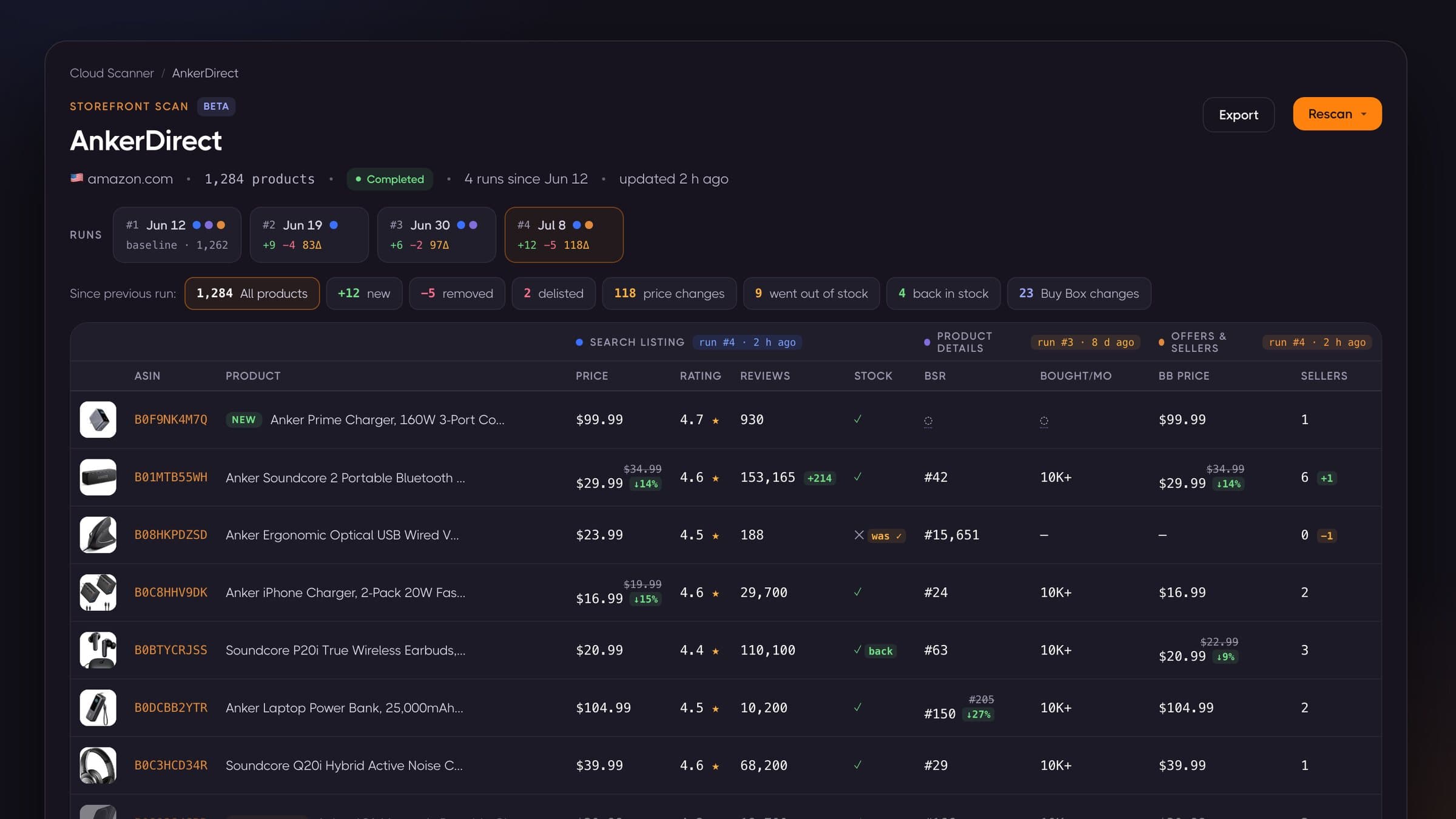
Amazon Storefront Stalking: See Every Product, Not a Sample